Budget Gaming Monitor Buying Guide & LG 24U41 Review

Having sold countless monitors as a reseller, I was enticed by a “remarkable deal” on an Acer SB243Y gaming monitor at Best Buy. I thought to myself, “This is definitely a steal!” However, I quickly remembered my usual habit of investigating the specifications thoroughly.
It quickly became clear why the price was so attractive. For just an extra $10, I discovered the LG 24U41. While it may not be twice the monitor in quality, it certainly outshines the Acer significantly. If you’re a gamer on a budget, understanding what truly matters in a monitor can prevent you from making a regrettable purchase.
What to Consider When Choosing an Entry-Level Gaming Monitor
Essential Features: 120Hz is Just the Beginning
For a monitor labelled as “gaming,” a minimum refresh rate of 120Hz is essential, meaning it refreshes its image 120 times each second. But aside from size variations (24″, 27″, 32″) and shape (flat versus curved), there are three critical features that will dictate whether your gaming experience is visually stunning or riddled with jagged graphics.
1. HDMI 2.0: Avoid Outdated Technology
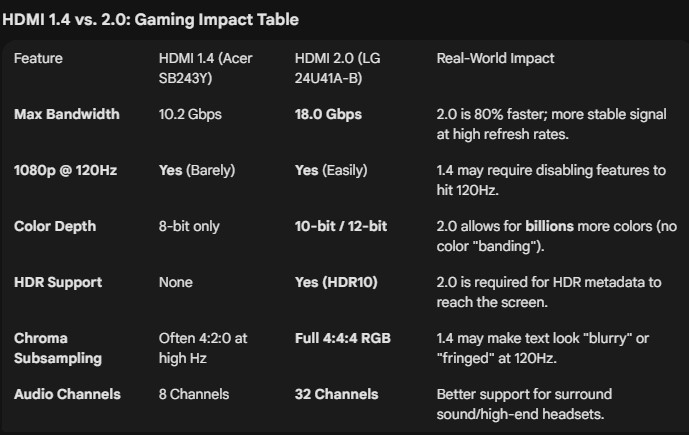
The Acer SB243Y only includes HDMI 1.4, which was my first warning sign.
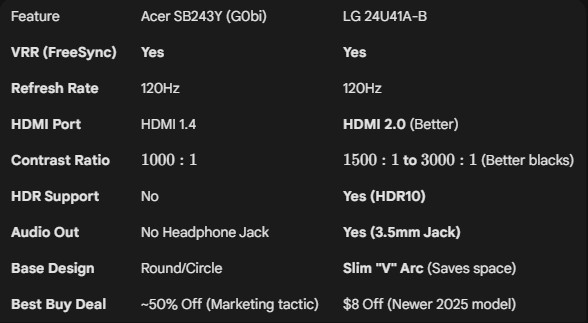
- Bandwidth Limitations: HDMI 1.4 can technically handle 120Hz, but only at its maximum capacity (10 Gbps). This means you may have to lower your game settings to maintain 120 frames per second. In contrast, HDMI 2.0 (like the one on the LG) doubles bandwidth to 18 Gbps.
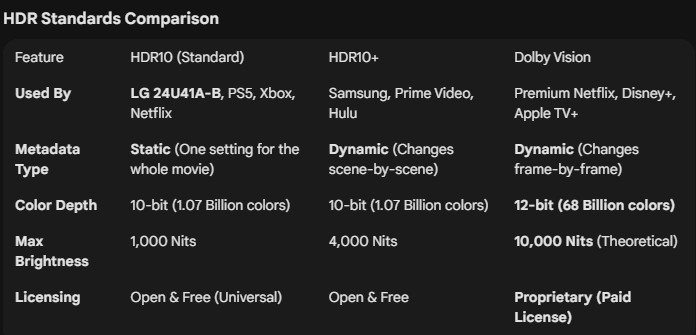
- High Dynamic Range (HDR): HDMI 1.4 does not support HDR, while the LG supports HDR10, allowing game developers to convey specific instructions on brightness and clarity to the monitor. This dramatically enhances your viewing experience compared to standard monitors.
- Audio Channels: HDMI 1.4 supports 8 audio channels; whereas HDMI 2.0 supports up to 32 channels. For those using the monitor’s headphone jack, richer sound quality is certainly preferable.
2. Response Time: The “Fudge” Factor
Manufacturers are known to exaggerate these numbers. You might see “1ms VRB” on the packaging and think it’s impressive, but it’s a different story.
- G2G (Gray to Gray): This is the true measurement. The LG monitor has a 5ms G2G response time. At 120Hz, a new frame appears every 8.3ms, making 5ms more than adequate for smooth gameplay.
- The VRB Fallacy: Visual Response Boost (VRB) claims “1ms” by quickly turning off the backlight between frames, which results in a dim image and poor colour fidelity. Moreover, it may lead to headaches for some viewers. Aim for G2G instead.
3. Contrast Ratio: Recognising the Differences
The contrast ratio indicates the difference in luminance between the brightest white and the darkest black.
- The Acer boasts a contrast ratio of 1,000:1, which seems acceptable.
- However, the LG offers a contrast ratio of 3,000:1, providing a striking visual difference. In this case, investing in a monitor with a 3,000:1 ratio is worthwhile for an immediately noticeable enhancement in visual clarity.
Unboxing the LG 24U41: An Overview of the Hardware
Upon unboxing the LG monitor, I was impressed by its sturdy metal base, which is quite weighty. While it features a tilt function, it lacks height adjustment—so you might need a stack of books if you require a higher setup.
Moreover, it comes with an HDMI 2.0 cable—a significant advantage. If you use an outdated 1.4 cable, you’ll miss out on all the benefits previously mentioned. At the back of the monitor, you’ll find:
- Power plug
- Headphone jack (a fantastic addition!)
- HDMI 2.0 port
- VGA port (for legacy devices)

Conclusion: Choosing the Right Monitor
How to Avoid Regrets
For around $100 Canadian (approximately $75 USD), the LG 24U41 stands out as a vastly superior choice compared to the “bargains” often found at major retailers.
It’s worth noting that this video and article are entirely unsponsored; Best Buy and LG haven’t compensated me at all. My aim is simply to help people avoid investing in outdated technology when superior options are just a small price increase away.
Share this content: