SOLVED: What Is Microsoft Pluton Security Processor? – Up & Running Inc
If you’ve been keeping up with my recent explorations into PC components, you might recall my morning almost derailed by a system freeze and an unexpected AMD “DRTM” alert. After power-cycling my machine and some investigation, it dawned on me I wasn’t dealing with malware; rather, I was witnessing a leap in security technology.
Specifically, I encountered Microsoft Pluton, and I must say, it’s quite fascinating. If you’re a tech enthusiast, you’ll likely share my excitement.
No TPM 2.0, no Windows 11?
Do you remember the uproar over “TPM 2.0” when Windows 11 was released? Now, we have CPUs like my AMD Ryzen AI 7 350 (housed in the incredible HP CT2000) that represent a significant advancement. This is a sophisticated evolution of the traditional “vault,” boasting a lineage that would impress even the most seasoned F1 engineers.
What’s a TPM? A Quick Refresher
Before we delve into the exciting details, let’s clarify what a TPM (Trusted Platform Module) is. Imagine it as your computer’s ‘Black Box’—a secure vault for storing sensitive cryptographic keys, including BitLocker credentials and Windows Hello PINs.
Traditionally, the TPM was a separate chip located on the motherboard. To combat hacking incidents that exploit the connections between the CPU and the TPM, the industry has largely shifted to firmware-based TPMs (fTPMs), which are embedded in the CPU’s firmware.
A TPM safeguards the keys, only unlocking them when the boot process checks out flawlessly. If it detects any interference with your BIOS, the TPM steps in, stating, “No chance, I’m not handing over the keys to the kingdom”.
From the Racetrack to Your Laptop
Formula 1 racing serves as a high-profile testing ground for technology that ultimately ends up in consumer vehicles. Features like active suspension, paddle shifters, and hybrid energy recovery started on racetracks before filtering into everyday use.
We see a similar trend in the CPU market. Microsoft Pluton initially sprouted from the Xbox and the Azure Sphere data centres, environments constantly at risk of physical hacking. With considerable investment stabilising these “chips-to-cloud” ecosystems, this extensive research and development has now filtered down to personal computing.
Much like how aerodynamics from an F1 car has influenced family SUVs, the significant R&D expenditures from the early 2020s have found their way into my HP CT2000 All-in-One.
Why Pluton is the “Next Gen” TPM Vault
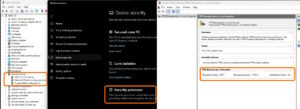
During my exploration of device settings, I noticed something notable. Even with an AMD fTPM, tpm.msc indicated the manufacturer as Microsoft.
That’s the influence of Pluton. Here’s why it’s a significant advancement:
- Direct Silicon Integration: Traditional TPMs are typically separate chips. A skilled hacker with a simple probe could intercept communications between the CPU and TPM. Pluton, however, is integrated directly into the CPU architecture, eliminating any potential “bus” vulnerabilities.
- The “Burned-In” Key: While standard TPMs have keys programmed during manufacturing, Pluton’s unique cryptographic identity is literally **burned into the silicon** using e-fuses during production. It’s not merely a data file; the keys are an intrinsic part of the chip.
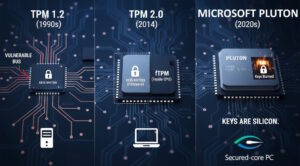
It’s worth noting that Pluton is so secure, it won’t disclose the keys burned into it—even to the Pluton firmware!
Unlike BIOS-based TPMs that require cumbersome updates from the laptop manufacturer (looking at you, HP/Lenovo/ASUS), Pluton’s security firmware is updated automatically by Microsoft via Windows Update. This ensures it’s perpetually patched and current.
The Nitty Gritty
If you’re interested in an in-depth technical analysis of the “on-die” versus “discrete” security architecture and Microsoft’s design for Azure servers, I recommend checking out this informative video:
Why Does Device Manager Show: TPM 2.0, AMD PSP, & an MS Pluton?
As evident from the screenshot in the “Why Pluton” segment, my Ryzen AI 7 350-based HP device displays three SECURITY DEVICES in Device Manager. Consider your CPU as a high-security facility, hosting two distinct high-security compartments for various tasks:
- Office A: The AMD PSP (Platform Security Processor):
- The Hardware: An ARM-based microcontroller designed by AMD
- The Role: Functioning as the “Landlord,” it oversees the initial stages of booting up the computer, confirming the BIOS/UEFI firmware and managing the fTPM 2.0.
- The fTPM: This serves as the “Legacy Vault,” operating as software (firmware) within the PSP.
- Office B: Microsoft Pluton:
- The Hardware: A security block developed by Microsoft but physically incorporated by AMD into the silicon.
- The Role: This serves as the new, isolated security processor, acting as an advanced, hardened TPM.
- The Identity: Activating Pluton effectively “masks” the fTPM, allowing Pluton to assume the role of the system’s TPM 2.0.
Both Pluton and the AMD Secure Processor (PSP) coexist. The PSP conducts low-level hardware interactions, while Pluton operates as the fortified, modern vault.
The Cost of Pluton
Both MS Pluton and fTPM are integrated within your CPU yet comprise less than 2% of its size, rendering the cost of Pluton negligible on a per-unit basis. The main expenses arose from the engineering, which is now a sunk cost, allowing us to enjoy the advantages.
Notably, it’s clear that Pluton isn’t an expensive addition, as both Pluton and fTPMs will coexist in CPUs for years to come, even though one may not be active. This strategy ensures that AMD, Intel, and ARM can market their CPUs across a diverse spectrum, from data centres to consumer laptops to IoT devices.
Does Windows Home Edition Support Pluton?
Indeed, even though Microsoft’s documentation states that Pluton is exclusive to Azure Servers, Windows Pro, Enterprise, and Education, it is also compatible with Windows Home.
Microsoft chooses not to overexpose too much technical detail in the Home edition to avoid overwhelming novice users. While Pro users might want to review specific PCR measurements in the security dashboard, Home users primarily desire assurance that their PIN works and their files remain secure.
The Wrap
It might seem intrusive to have Microsoft physically embedded within your CPU silicon, particularly among the Linux community (although Linux drivers for Pluton are beginning to arrive). However, for those of us running Windows 11 25H2 or later, it signifies the availability of hardware that is inherently resistant to interception attacks, which were once merely the stuff of films.
So, the next time you encounter those peculiar AMD or Pluton driver updates, resist the urge to panic and power off your device as I did. Take a moment to breathe, allow it to restart, and appreciate that your laptop now utilizes technology developed to secure some of the world’s most sensitive data centres.
Share this content: