Stop WordPress Comment Spam When They Are Already Disabled

Some websites prefer to completely disable comments on their posts or pages. There’s a straightforward way to achieve this, though it won’t entirely eliminate spam. Luckily, we have solutions for that!
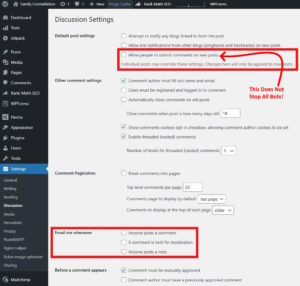
How To Disable Comments in WordPress – Conventional Method
- Log in to your WordPress Dashboard
- Navigate to Settings > Discussion
- In the section titled Default post settings, untick the box for:
"Allow people to submit comments on new posts" - Scroll down and click Save Changes
However, this method does not prevent bots from bypassing the WordPress interface and submitting comments directly to your database.
How To Completely Block Comments, Including Spam
1 – The Simplest Method
If you’re looking for a hassle-free solution to eliminate all comment fields across your site, even those in specific layouts designed by your theme:
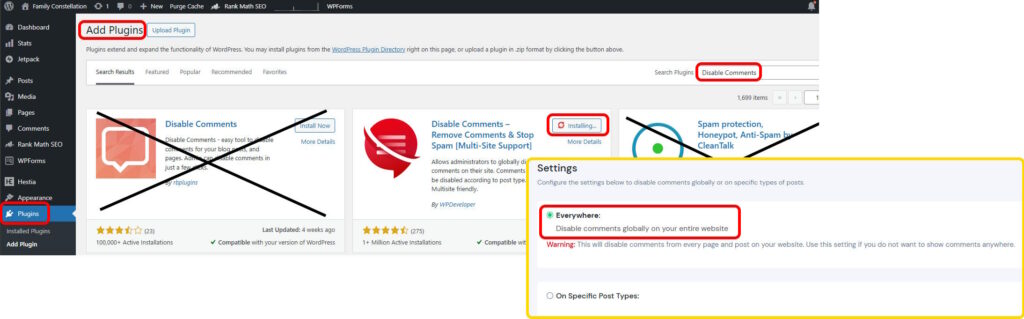
- Go to Plugins > Add New
- Search for Disable Comments
- Install and activate the plugin
- Navigate to Settings > Disable Comments and select Everywhere
2 – The Code Method
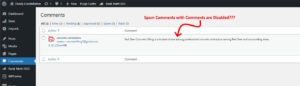
Bots typically exploit two main methods to submit comments:
- Direct POST Requests: They submit data directly to
wp-comments-post.php, bypassing the need for a form. - REST API / XML-RPC: They utilise these programmatic interfaces to inject comments directly into your database.
Here’s how to barricade these approaches:
1. Disable the REST API for Comments
The REST API allows modern applications to communicate with your site, but it’s also a preferred entry point for bots. Specifically disabling the comments endpoint can prevent them from taking advantage of it.
- Option A (Plugin): If you have the Disable Comments plugin installed, visit its settings and make sure the option for “Disable via REST API” is checked.
- Option B (Code): To stop the API from processing comments, add the following code to your theme’s
functions.phpfile:add_filter( 'rest_endpoints', function( $endpoints ) { if ( isset( $endpoints['/wp/v2/comments'] ) ) { unset( $endpoints['/wp/v2/comments']; } return $endpoints; });
2. Block direct access to wp-comments-post.php
You can configure your Server to deny access to the script responsible for processing comments. This can be done by adding the following lines to your .htaccess file, which you can find in your site’s root directory via FTP or File Manager:
    Order Deny,Allow
    Deny from all
This is an extreme measure, effectively blocking access to the WordPress comment system.
3. Disable XML-RPC
XML-RPC is an older interface, functioning similarly to the REST API. If you’re not using the WordPress mobile app to manage your site, it’s advisable to disable this feature.
To do so, you can install the Disable XML-RPC plugin, or check if your security plugin (such as Wordfence or Sucuri) has an option for it.
Conclusion
Dealing with spam is frustrating, and understanding how it infiltrates your site can shed light on its operations. We hope these methods help in securing your WordPress site effectively.
Share this content: