How to Report Malicious Scam Sites & Ads (SIMPLE Step-by-Step Guide)

Warning Signs: Security Alerts, Unrealistic Pricing, and Urgency
The other day, while I was merely tidying up my Yahoo Mail inbox, I made a slip. One inadvertent click on an ad that looked dubious from the outset, and suddenly my browser was bombarding me with alarming notifications:
“Your McAfee subscription has expired!”
“Your computer is infected with 5 viruses!”
“Get 80% off!”
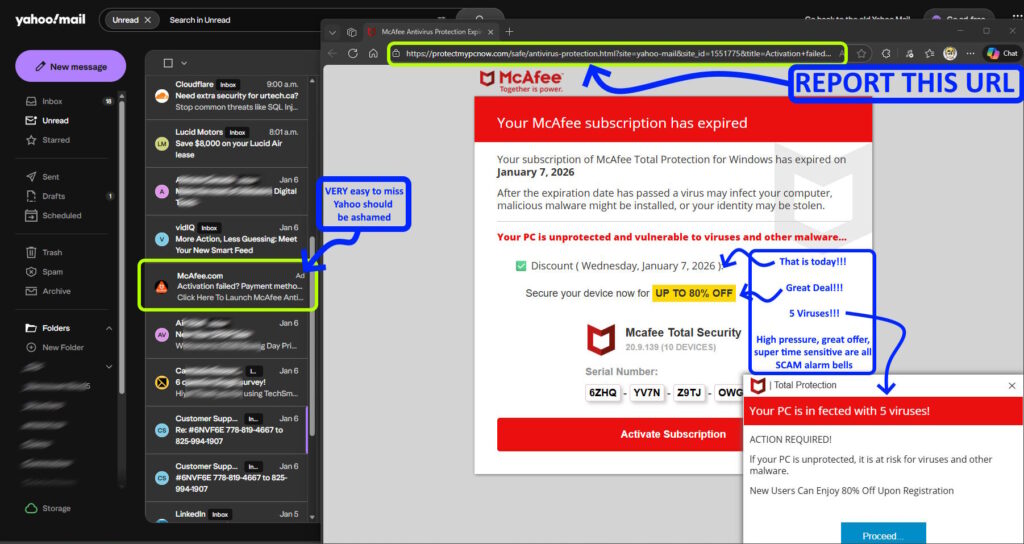
Now, I have strong feelings about retail McAfee: it’s cumbersome, intrusive, and I wouldn’t even accept it as a freebie. In fact, my current system, an impressive HP CT2000 All-in-One, came with a subscription, which I promptly uninstalled! Thus, the notion that I have an expiring subscription is utterly ridiculous. However, for those less familiar with technology, these fear-inducing tactics can be quite effective. They employ alarming red banners, forged serial numbers, and high-pressure pop-ups to trick unsuspecting individuals into revealing their credit card details or inadvertently downloading actual malware.
Rather than simply closing the tab and brushing it off, I want to take action against these malicious sites. If you feel the same way and wish to combat this cybercrime, here’s how to report these digital deceivers to the authorities capable of shutting them down.
The “Internet Janitor” Rankings
Not all reports carry the same weight. If you only have a couple of minutes, address the top three options. If you can spare longer, complete the entire list. I have ranked these according to their potential global impact (i.e., how many users will be safeguarded once a site lands on their blacklist).
You might need to shorten the scam URL to its root address. For instance, in the
https://protectmypcnow.com/safe/antivirus-protection.html?site=yahoo-mail&site_id=15..., the lengthy portion can be truncated after the?. Therefore, you can report:https://protectmypcnow.com/safe/antivirus-protection.html
| Rank | Company / Service | Function | Report Link |
| 1 | Google Safe Browsing | The top player, responsible for the Red Screen alerts in Chrome, Firefox, and Safari | Report a Malicious Site |
| 2 | Microsoft Security | Supplies the SmartScreen filter used by every Windows PC and the Edge browser (which operates on Chrome’s framework) | Report an Unsafe Site |
| 3 | Spamhaus | The industry benchmark. If they blacklist a domain, it won’t land in any major inbox | Spamhaus Submission Portal |
| 4 | Netcraft | A community-based giant that instigates domain suspensions by hosting providers | Netcraft Reporting |
| 5 | Cisco Talos | Comprehensive protection for enterprises. Blocks sites at the corporate firewall level | Cisco Talos Reputation Skip this if you lack a Cisco Account… a bit annoying! |
| 6 | Google Ads | Investigates and bans accounts financing these harmful redirects | Ads Complaint Form For Google Ads |
| 7 | URLhaus (abuse.ch) | Swiss initiative focused on combating malware and virus distribution | URLhaus Submission Requires an Account |
| 8 | PhishTank | Collaborative database used to confirm and block credential theft pages | Submit a Phish Requires an Account |
| 9 | BrightCloud | Utilises predictive AI to inform security software if a site’s reputation is poor | URL/IP Lookup |
| 10 | CloudFlare | Issues warnings before sites and reveals the actual host for takedown | Phishing & Malware Reporting |
Importance of the Ranking
- User Protection (Ranks 1-2): These services are critical because they provide visible warning messages. If you aim to prevent your loved ones from inadvertently clicking “ALLOW” on a fraudulent update, these are the go-to options.
- Infrastructure Defence (Ranks 3-5): These act as silent protectors, blocking access at the Server or email gateway level. The user never even encounters the harmful link.
- Source and Focus (Ranks 6-10): These target the funding of scams or concentrate on specific threats such as malware downloads or phishing schemes.
Conclusion: Stand Against Cyber Threats
Scammers exploit our busyness or reluctance to act against their illicit practices. Taking just a few minutes to copy and report that malicious URL (like the protectmypcnow.com nonsense I stumbled upon in my Yahoo Mail) not only safeguards you but also protects countless others who might click that same ad tomorrow.
And really, avoid purchasing McAfee (well, their corporate solutions are decent, but in my extensive experience of over 30 years in tech support, consumer-level antivirus products have been terribly cumbersome and costly). You’re far better off with the complimentary and built-in Windows Defender, coupled with a healthy dose of scepticism. Stay safe out there!
Share this content: