Azure AI Foundry: from zero to production
What I discuss when a customer asks, “We want to create AI applications on Azure, how do we begin?”
TL;DR: Azure AI Foundry is your go-to platform for creating AI applications on Azure. Start with Standard PAYGO, use Priority Processing when lower latency is crucial but traffic is variable, and shift predictable baseline traffic to PTU once usage surpasses 60-70%. Check out ptucalc.com to estimate your costs beforehand.
This guide is crafted for engineering teams transitioning from a prototype to production on Azure AI Foundry. If you’re still considering if Foundry is the best fit for you, visit ai.azure.com.
A few weeks ago, I spoke with an engineering team eager to develop their first AI-driven application on Azure. They had played around with ChatGPT and tested the OpenAI API. Now, they wanted to know: how do we turn our experiments into a full-scale, enterprise-level production?
That chat led to a workshop, then a presentation, and now this guide. The inquiries they raised are ones I hear repeatedly from every team taking this leap.
Azure AI Foundry serves as the central hub for creating, deploying, and managing AI applications on Azure. Think of it as your AI control panel within the Azure ecosystem:
- Model Catalogue: Over 1,900 models available (including OpenAI, Meta Llama, Mistral, Cohere, Phi, and more)
- Prompt Engineering: Tools for experimenting, prompt flow, and evaluations
- Deployment Choices: Standard and Priority pay-per-token processing, Provisioned Throughput (PTU), Global/Data Zone routing
- Safety and Governance: Tools like content filters and model monitoring
- Agent Framework: Supports multi-step AI agents capable of tool-calling and searching files
Foundry isn’t just another Azure service; it seamlessly integrates models, data, computing, and governance into a single development interface.
Every team utilising Foundry typically encounters the same set of questions in a similar order.
Here’s an overview of the model landscape as of mid-2026:
| Model | Best Use | Trade-off |
|---|---|---|
| GPT-5.x | Complex reasoning, multi-step agents | Highest capability, but also the highest cost |
| GPT-5-mini | Quick tasks like classification and summarising | Offers 90% of GPT-5 quality at 20% of the cost |
| GPT-4.1 | Legacy applications (phasing out) | Stable but becoming outdated |
| Phi-4 | Edge deployment, fine-tuning | Compact, quick, cost-effective, and customisable |
| Llama 3.x | Open-weight flexibility, on-premise needs | Full control, requires self-management |
My suggestion for agent workloads: Utilise GPT-5.x for your orchestrators (best for tool-calling accuracy), GPT-5-mini for sub-tasks like classification, and Phi-4 or customised models for domain-specific functions.
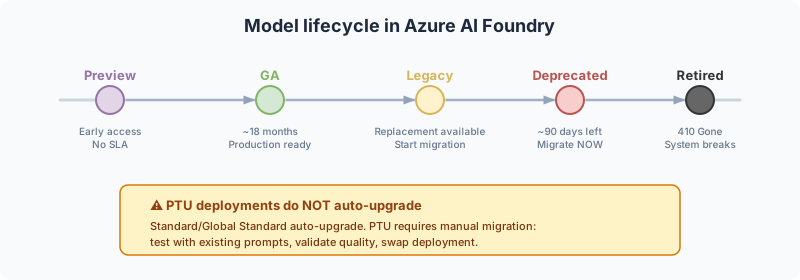
All models within Foundry follow a lifecycle that includes: Preview, General Availability (GA), Legacy, Deprecated, and Retired statuses.
What’s crucial to know:
- GA typically lasts around 18 months. This sounds lengthy, but it passes quickly once your system is live.
- Legacy means a replacement is available, so you should start planning your migration.
- Deprecated provides about 90 days for migration. Post this period, the API will return a 410 Gone error, and your system will cease operations.
A vital point: if you’re using Provisioned Throughput (PTU), model migration is NOT automatic. You’ll need to manage it manually: schedule maintenance, test the new model with existing prompts, ensure quality, and complete the swap. Standard and Global Standard deployments will auto-upgrade, but you don’t have control over when this occurs.
My advice: establish a model governance protocol. Keep an eye on Azure Updates, implement automated quality tests for each model, and initiate migration planning at least 60 days before a retirement.
3. Choice of Deployment: Standard, Priority, or PTU
Teams often overthink this aspect. The rule of thumb is straightforward:
Start with PAYGO (Pay-As-You-Go) if:
- You are in the development/testing phase
- Your traffic is unpredictable or bursty
- You are still determining the models you’ll use long-term
Add Priority Processing when:
- The workload is user-oriented and sensitive to latency
- Traffic is irregular or spiking during business hours
- You need to hit model-specific latency goals without reserving PTU capacity
Transition to PTU (Provisioned Throughput Units) when:
- Sustained usage exceeds 60-70% of your PTU capacity
- You need assured latency (no adverse impacts from other users)
- You’re operating production workloads with predictable traffic patterns
Priority Processing provides a balance between Standard PAYGO and PTU. It maintains pay-per-token billing and doesn’t require reservations, but requests that meet the criteria are processed in a priority service tier with a defined latency target specific to each model. You can turn it on for either a complete Global Standard or US Data Zone Standard deployment, or enable it per request with service_tier: "priority".
The main advantage? It delivers more consistent low latency for interactive agents, copilots, and other time-critical scenarios without the necessity for dedicated capacity during downtime. A common approach is to reserve Priority Processing for requests that users actively await while background tasks like summarising or evaluations continue under Standard. For predictable traffic patterns, PTU remains the most economical choice.
Priority isn’t reserved capacity. Azure might process a request on the Standard tier during peak periods, for long-context requests on certain models, or if traffic spikes by over 50% tokens per minute within 15 minutes. In this situation, the response will indicate service_tier: "default", and the request charges will align with the Standard rate. To ensure you know how requests are processed, monitor ServiceTierRequest and ServiceTierResponse in Azure Monitor instead of assuming every request used Priority pricing.
Rule of thumb: Use Standard for flexible general traffic, Priority for sensitive bursts, and PTU for reliable baseline throughput. Many production systems can effectively utilise all three.
PTU operates using a token-bucket model, whereby each PTU reserves a fixed throughput in tokens per minute. This rate varies by model:
- GPT-5-mini: Approximately 3,500 tokens per minute per PTU
- GPT-5: Varies by its sub-variant
- GPT-4.1: 3,000 tokens per minute per PTU (phasing out)
Hence, 100 PTUs of GPT-5-mini provide around 350,000 tokens per minute assured. Exceed that, and the API will respond with a 429 error. No queues, no waiting. That’s the hard limit.
| Tier | Price (as of July 2026) | Commitment |
|---|---|---|
| On-Demand | ~$2/hour/PTU = $14,400/month | No commitment |
| Monthly Reserved | ~$0.72/hour/PTU = $5,184/month | 1 month |
| Yearly Reserved | ~$0.60/hour/PTU = $4,320/month | 1 year |
The break-even point is clear: if your sustained usage surpasses 60-70% of your PTU capacity, monthly reservations begin to outperform PAYGO.
These prices are indicative as of July 2026. Negotiated rates with EA/MCA might differ. Always check your specific agreement.
I created ptucalc.com for these very calculations. It is open-source; just input your usage patterns, and it’ll recommend the best tier and PTU count.
For a robust production pattern, I recommend the following approach:
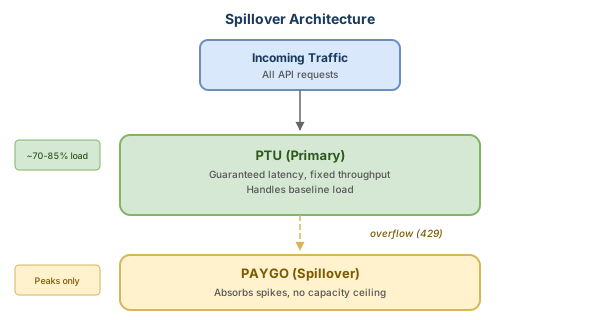
Configure your deployment with PTU as the primary and PAYGO as a backup. This setup allows you to:
- Ensure guaranteed latency for your baseline traffic (PTU)
- Avoid dropped requests during peaks (PAYGO handles overflow)
- Optimise costs (PTU for steady-state, PAYGO for spikes)
This configuration takes place at the deployment level in Foundry, requiring zero changes to your application code.
The points above will get you started. The sections below will help ensure a safe and scalable operation with proper governance.
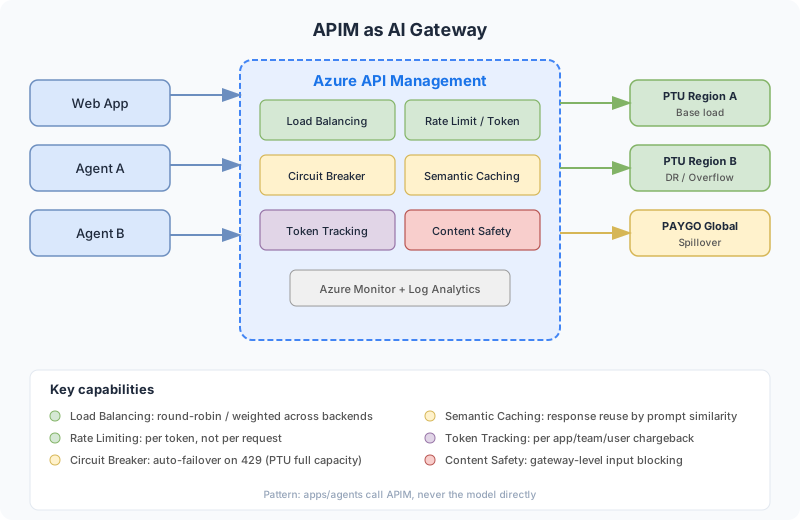
For any AI production workload, I advise placing Azure API Management (APIM) between your applications and models. APIM acts as a centralised AI Gateway, offering six capabilities that Foundry alone doesn’t:
- Load balancing: Distributes requests across multiple PTU or PAYGO backends, adding DR and capacity management between regions.
- Token-based rate limiting: Unlike traditional request counts, APIM tracks actual tokens used. A request that consumes 10,000 tokens is treated distinctly from one that uses 100 tokens, making it fairer for usage control.
- Circuit breaker: If a PTU backend returns a 429 error, APIM automatically shifts to another backend (another PTU or PAYGO) without needing a client-side retry.
- Semantic caching: Stores responses based on prompt similarity. If a similar query has been made recently, the response is retrieved from cache, reducing costs and latency.
- Token tracking: Provides detailed consumption metrics per app, team, and user, emitted to Azure Monitor. This is crucial for cost accountability when different teams share the same models.
- Content safety: Implements gateway-level policies preventing harmful inputs from reaching the model, enhancing security atop Foundry’s content filters.
In practice, your applications and agents will call APIM, not directly connect to the model. APIM will take care of routing, control, monitoring, and protection.
For those building multi-agent systems, I recommend this architecture:
- Orchestration layer: A primary agent (ideally utilising the best model available, currently GPT-5.x) coordinating sub-agents, maintaining conversation context, and directing actions.
- Specialised agents layer: Each agent is tuned for a specific task using the appropriate model. For example, a data extraction agent based on Phi-4, a compliance agent on GPT-4.1, and a UX agent on GPT-5. Different models cater to different tasks, enhancing both cost-efficiency and quality.
- Gateway layer (APIM): Positioned between agents and models. Each agent has distinct rate limits, routes to various models, and the circuit breaker guards against throttling, ensuring a consolidated governance structure.
- Models layer (Foundry): Boasts multiple deployments with PTU handling base load and PAYGO for burst modes. Multi-region support ensures DR. The spillover happens automatically via APIM routing.
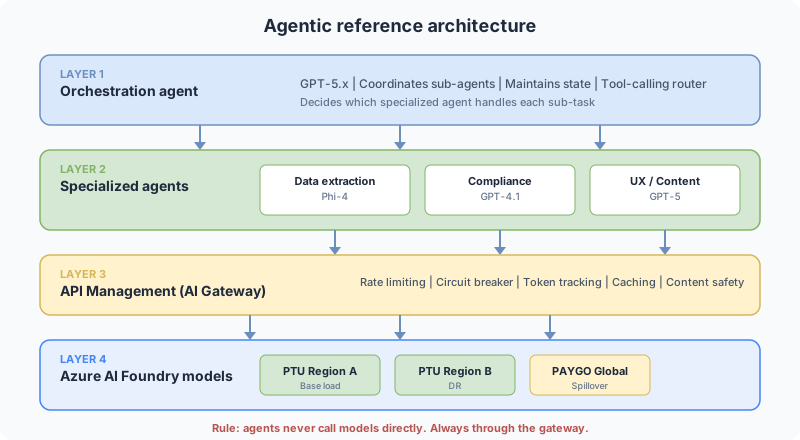
The critical takeaway here is that agents never interact directly with models. Interactions always go through the gateway. If an agent misbehaves and consumes an excessive number of tokens, you can halt it at the gateway without modifying the agent’s code.
If you’re using Azure SRE Agent in tandem with your AI workloads, Skill 08 (AI Foundry & OpenAI Posture) can regularly audit your Foundry setup against these architectural patterns. Check out my related post: Custom skills for Azure SRE Agent.
Here are some common pitfalls I see consistently in production. They might seem apparent once highlighted, yet they frequently occur:
| Common Mistake | Recommended Action | Consequences of Ignoring |
|---|---|---|
| Embedding API keys in code | Use Managed Identity + Key Vault | Risk of credential leaks and billing attacks |
| A single endpoint for all | Implement APIM Gateway with routing | Lack of visibility and potential noisy neighbours |
| Overprovisioning for peak times | Embrace Spillover (PTU base + PAYGO burst) | 60%+ idle capacity, leading to waste |
| Neglecting model lifecycle | Establish a test pipeline and migration strategy | Risk of a 410 Gone error in production, causing outages |
| Relying on default max_tokens (4096) | Determine max_tokens based on your specific use case | Elevated PTU usage and wasted capacity |
| Retrying without a backoff strategy | Implement exponential backoff with jitter | Possible retry storm leading to cascading 429 errors |
Pay attention to the max_tokens recommendation: Azure calculates PTU usage based on both input tokens AND the reserved max_tokens, even if your response is shorter. So if you set max_tokens to 4096 under the assumption that your average response is 200 tokens, you’re wasting resources. ptucalc.com has a specific tool to address this.
Before a customer goes live, here’s what I check:
Security and Networking
Most teams I collaborate with follow this progression:
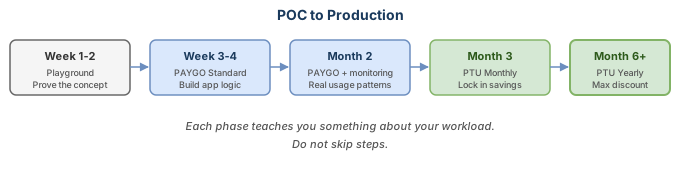
Don’t skip any steps. Each phase will provide insights into your workload that will guide your next choices.
- Access the Foundry Playground and test the models with real use cases
- Model your expenses using ptucalc.com before committing to PTU
- Implement spillover from the beginning. It incurs no additional costs while PTU manages the load, yet it saves during peak times
- Establish monitoring early. You cannot optimise what you cannot track
- Deploy a model in Foundry: choose GPT-4o on PAYGO, connect it to a single endpoint, and run a test prompt through the REST API. Estimated time: 20 minutes.
- Run ptucalc using your traffic data: export token usage from Azure Monitor and ascertain the break-even point. If your usage surpasses 60% continuously, PTU probably justifies itself.
- Set up APIM in front: even in development. Create a fundamental policy with token-rate-limit and emit-token-metric. This gives you observability and a retry layer from the outset.
Additional Resources:
If you have questions regarding deployment strategies or cost-calculation, feel free to drop a comment.
Share this content:
Discover more from Qureshi
Subscribe to get the latest posts sent to your email.
