SQL Server on Azure Local is now generally available
Many essential databases operate in locations where reliable cloud connectivity can’t be guaranteed. Take a remote industrial site, for instance. It might be crucial for production systems to function without external internet access. Similarly, a regulated entity may require sensitive data and operations to stay within local jurisdiction.
Currently, SQL Server on Azure Local is fully available for both connected and disconnected situations. This latest version allows customers to update the location of their data while retaining control over their infrastructure and where their data is stored. With the upcoming Foundry Local on Azure Local, still in preview, businesses can leverage AI capabilities closer to their data and utilise their existing SQL Server licenses.
Deploy SQL Server Where Your Data Needs to Reside
SQL Server has a proven track record of supporting mission-critical tasks on customer-owned infrastructure. With Azure Local, this flexibility is enhanced by introducing Azure infrastructure within client environments. This provides companies with a cohesive platform for running SQL Server across various data centres and edge locations.
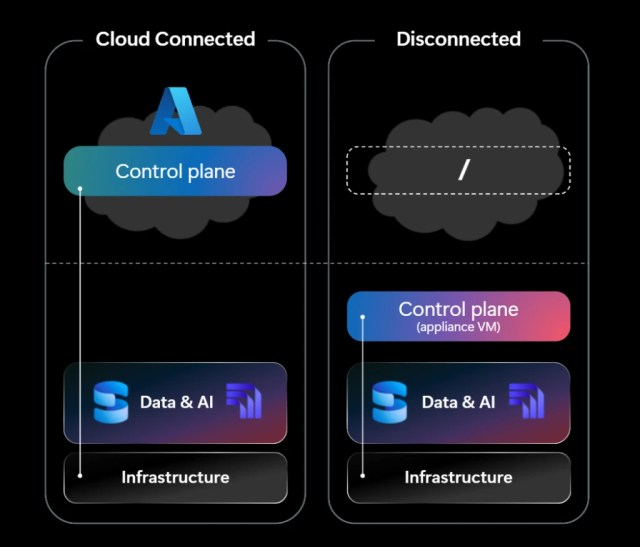
Customers can tailor their deployment model according to the specific needs of each environment:
This allows organizations to select the best deployment strategy for each setting rather than adopting a uniform connectivity policy across their entire data ecosystem.
Integrate AI Near Your Data
While updating your infrastructure is crucial, organizations also aim to incorporate generative AI into their existing enterprise data without needing to move it elsewhere.
Through Foundry Local, customers can implement AI models on Azure Local infrastructure alongside SQL Server. This proximity to data allows organizations to start using AI-driven applications while ensuring sensitive data processing stays within their own facilities.
This is especially helpful in sovereign, regulated, and edge environments, where companies want to harness AI benefits while retaining greater control over the execution locations of models and data processing.
The aim is clear: customers should not need to relocate sensitive data just to kick-start the development of intelligent applications around it.
Leverage Your Existing SQL Server Investments
Modernization should simplify building upon your existing investments.
SQL Server licensing operates separately from the Azure Local infrastructure platform. For connected deployments, customers are welcome to use existing eligible SQL Server licenses, including those with Software Assurance or qualifying subscriptions, or opt for pay-as-you-go licensing through Azure Arc.
For fully disconnected setups, customers can utilize qualifying existing SQL Server licenses through the Azure Hybrid Benefit.
This provides organizations with various options for modernizing their SQL Server setup while leveraging the licensing investments they already possess.
A Strong Foundation for Sovereign and Edge Data
Enterprise data architectures increasingly encompass cloud, data centres, edge, and sovereign settings. The goal isn’t to compel every workload into a single deployment model. Instead, we aim to provide organizations with a consistent modernization pathway throughout them.
SQL Server on Azure Local broadens these choices for mission-critical SQL Server workloads, allowing customers to modernize near their data, applications, and operations while integrating Azure-consistent infrastructure and local AI capabilities.
SQL Server on Azure Local FAQ
What is SQL Server on Azure Local?
SQL Server on Azure Local enables organizations to run SQL Server within Azure Local infrastructure located in their own data centres and edge sites. It supports SQL Server workloads on virtual machines running both Windows Server and Linux.
What distinguishes connected from disconnected deployments?
Connected deployments rely on Azure connectivity and can utilise Azure Arc to manage SQL Server resources via Azure. In contrast, disconnected operations are intended for settings where external connections are limited or absent, allowing local operations to continue uninterrupted.
Who should think about SQL Server on Azure Local?
It’s crafted for organizations that require local control due to factors such as sovereignty, regulatory demands, latency, operational continuity, or edge requirements. This includes sectors like public service, defence, finance, healthcare, manufacturing, energy, and any other environments constrained by connectivity rules.
Are existing SQL Server licenses valid for use?
Customers can use qualifying existing SQL Server licenses in accordance with relevant licensing guidelines. For connected setups, they can also select pay-as-you-go options through Azure Arc. Fully disconnected deployments can make use of eligible licenses via the Azure Hybrid Benefit.
Can companies operate AI close to their SQL Server data?
Foundry Local on Azure Local facilitates the use of AI inference right in the Azure Local landscape, designed specifically to keep data processing on-site. Currently, as of September 29, 2026, Foundry Local on Azure Local is in preview, meaning availability and features may evolve before general release.
Where can I locate deployment guidance?
For detailed instructions, Microsoft Learn offers comprehensive guidance for deploying SQL Server on Azure Local. This helps with hardware selection, SQL Server installation, ongoing monitoring, performance optimisation, high availability, and other related Azure hybrid services.
Begin Your Journey with SQL Server on Azure Local
SQL Server on Azure Local is now generally available, offering solutions for both connected and disconnected deployments.
Additional Resources
Share this content:
Discover more from Qureshi
Subscribe to get the latest posts sent to your email.
