Understanding Harnesses: The Concept That Changes How You Build Agents in Copilot Studio
Everything changed on August 3, 2026, when Microsoft unveiled the GitHub Copilot harness to everyone. Now, Copilot Studio comes with three distinct harnesses, and selecting one is the first crucial architectural choice you’ll face when you start a new agent.
This is definitely a positive development. It shows that the platform acknowledges that not all agents serve the same purpose. However, the term “harness” might be unfamiliar to many developers, so let’s break it down.
According to Microsoft, a harness serves as the runtime layer that sits between the language model and the agent’s setup. It determines what context is fed into the model, controls when certain tools are activated, interprets responses, and guides the agent through tasks until they are finished.
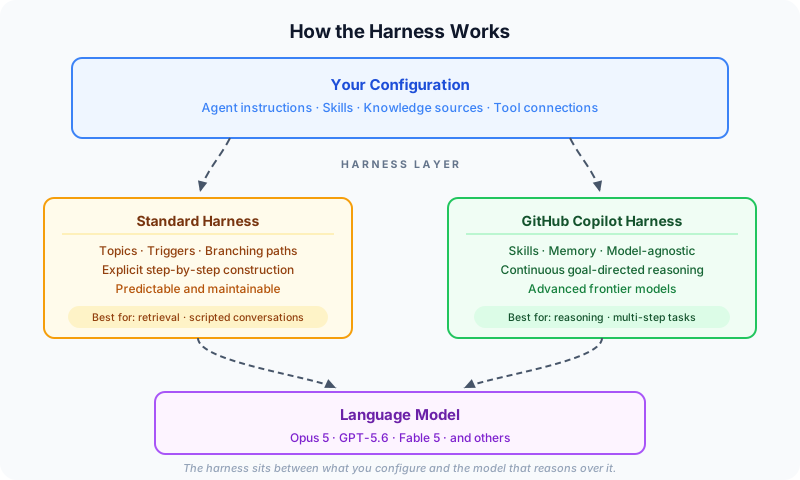
The best analogy I’ve come across, courtesy of Lisa Crosbie, compares the model to a newly hired employee, equipped with knowledge, language skills, and reasoning ability. The harness, on the other hand, comprises the tools and resources provided to them: the laptop, access to necessary systems, the team, policies, and other essential instruments. You’ve employed the intellect, and the harness is what enables that intellect to perform the tasks you’ve set.
Prior to this update, that layer wasn’t visible because it was uniform. Now, it’s a conscious choice, marking a significant shift towards Copilot Studio evolving into an agent engineering environment instead of merely being a chatbot creator.

Here’s a crucial takeaway: the GitHub Copilot harness is model-agnostic, meaning the model you choose becomes the agent’s primary brain.
This marks a departure from previous options. In the past, you could only use a Foundry model within a specific prompt, which was handy but limited. Now, advanced reasoning models like Opus 5, GPT-5.6, and Fable 5 can take charge of the entire agent. Microsoft’s description, as shared by Ryan Cunningham, illustrates that the harness hosts a sophisticated reasoning model within its own computing space, equipped with a set of tools and capabilities, enabling it to tackle complex challenges.

It’s essential to note a couple of practical details: your organisation decides which models are accessible, so your view in the model picker is influenced by administrator configurations. Furthermore, the availability of models can differ by region; certain providers may not be accessible in specific locales. Always verify what models you have at your disposal before you design around a particular one.
If you’ve been creating agents for some time, this shift is transformative. The Standard harness couldn’t reach these new capabilities, which is precisely why this new harness has been introduced.
The Standard harness is what many of us are familiar with. You create topics, establish triggers, and construct branching paths to guide interactions. The behaviour is built meticulously, step by step.
This harness remains fully operational and is still perfect for a variety of real-world applications. Whether you’re building a service desk agent that answers predictable queries, a scheduling assistant that directs users through a defined flow, or an onboarding agent guiding new hires through a set process, the routine is crucial, and this explicit construction offers just that.
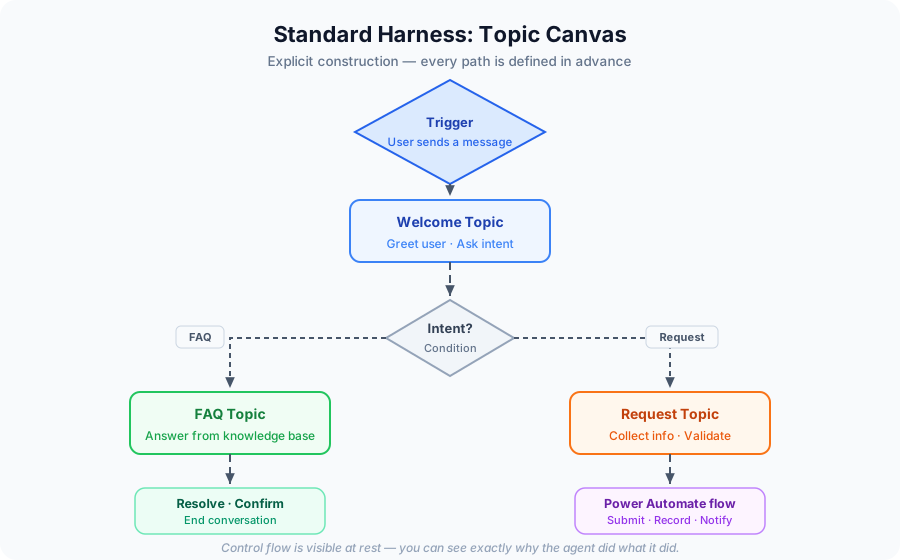
For those learning how to create agents, this harness provides valuable lessons: it makes control flows visible. You can clearly see why the agent responded in a certain way, as you mapped out the flow yourself.
It’s important to note that existing Standard harness agents will continue to operate smoothly; nothing will break. However, to make changes, you’ll need to work within the classic interface. These two experiences are indeed distinct.
The new harness adopts a different methodology. Rather than scripting out conversation paths, you describe the agent using natural language, while the orchestration runtime interprets these instructions in real time.
The reasoning process has also evolved. The older orchestrator operated in a fairly linear manner: it would take input, formulate a plan, gather necessary information, and execute that plan. The new orchestrator, however, runs in a continuous loop: it evaluates goals, formulates a plan, calls upon tools, examines outcomes, adjusts as needed, and continues until the objective is reached. This looping process allows the agent to handle uncertainty, recover from setbacks, and maintain focus through multi-stage tasks.
Unlike the previous orchestrator that made a plan and executed it, the new one keeps thinking.
According to Microsoft’s comparative statistics, significant improvements have been made, with multi-tool usage rising from 87% to 98%, alongside enhanced capabilities in file analysis, code evaluation, and knowledge work. It’s wise to cross-check these numbers against the latest documentation, as they’re subject to updates.
With this new approach come various features:
- Skills: these reusable Markdown instruction sets can be shared among agents and easily exported. They can also bundle other resources, including documents and Python files.
- Memory: persistent context is maintained across interactions, capturing user preferences.
- Connected agents: these serve as front-line agents directing users to specialists, with each specialist existing independently.
- Sandboxed execution: this allows for processing large files and native creation of Word, Excel, PowerPoint, and PDF documents.
- Build, Preview, Evaluate, Monitor: the new harness streamlines these functions into just four tabs, condensed from nine.


Speaking of the Evaluate tab, it deserves special mention. As Cunningham points out, evaluation is now more critical than ever. It involves presenting agents with challenging tasks and scoring how they perform while you refine instructions and skills. Integrating evaluation into the primary authoring surface rather than keeping it as a separate tool signals the future direction of agent development. If you’re a student working on agent creation, familiarising yourself with evaluation early on will be incredibly beneficial.
In this upgraded harness, topics have been eliminated. This caught many developers off guard, so it’s essential to grasp the reasoning behind this change rather than merely acknowledging it.
Topics provided a way to script conversations, beneficial for directing interactions along a specified path, but weren’t aligned with how advanced models work. Skills serve as their replacement and operate differently: they consist of a Markdown file containing a set of instructions the agent can access on demand, at the right moment, instead of one large instruction block trying to cover every eventuality.
This resolves a common issue for those who have had to write lengthy agent instructions. Instead of inflating one set of guidelines, you break down behaviours into sets of instructions the agent can retrieve as needed.
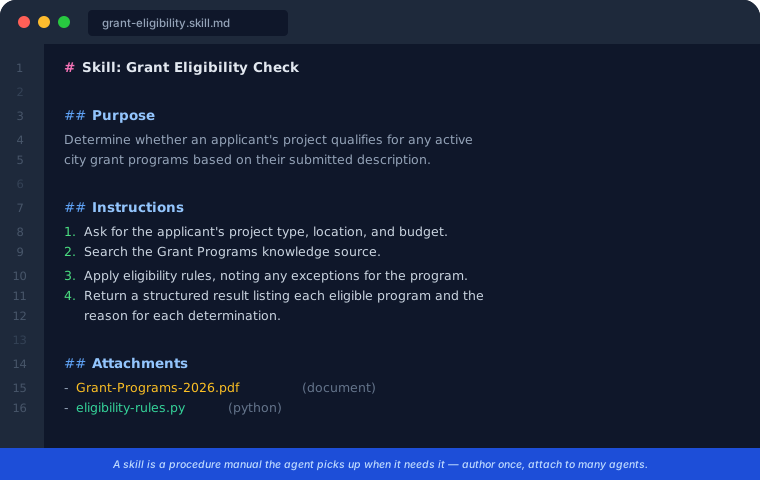
A skill is effectively a procedure manual that the agent consults as necessary.
The reusability aspect is particularly noteworthy. You create a skill once, then you can attach it to multiple agents, export it, and share it with ease. This format is also spreading; skills are becoming available in Cowork, PowerPoint, Word, and across GitHub Copilot. Thus, a skill file becomes a portable, human-readable unit of agent behaviour that can be version-controlled.
This is an excellent teaching tool, especially in an educational setting. A skill file is concise enough to be discussed in a single class session yet tangible enough to be implemented effectively. If you experiment with just one thing this month, try creating a skill from scratch and integrating it into multiple agents.
This structural shift is being undervalued.
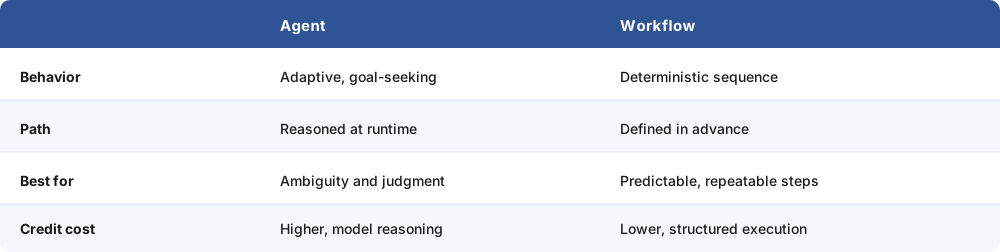
Neither option is “advanced”—they work in tandem. An agent reasoning through a problem can invoke a workflow when it requires a reliable sequence, and a workflow executing its tasks can call on an agent when a judgement is necessary. Cunningham highlights a crucial point: structuring tasks in this manner is more cost-effective, as you leverage model reasoning only where it brings added value.
The workflow designer has been revamped to facilitate this: it features a horizontal canvas, allowing agents to be embedded as nodes, and enables node-by-node testing, which means you can validate each step during construction rather than hoping everything works when testing the entire system.

This is particularly relevant for governmental tasks, where a permit intake might need to interpret a complex description to determine which department is responsible before directing it to a structured workflow for notifications, record-keeping, and routing. This ensures that reasoning is applied where needed, while predictable steps are used elsewhere.
Whenever I embark on a new build, I always ask myself:
Is the challenging part of this agent retrieval-focused, or is it about reasoning?

If retrieval is the challenging aspect, ensure a strong grounding, and keep behaviours predictable so that the maintenance aspect remains manageable. You’re not missing out; you’re aligning the tool with the actual issue at hand.
As someone who builds Power Platform solutions for local authorities, my examples tend to stem from there: a grant eligibility form that assesses a federal guideline against local programmes, a compliance review looking into multiple ordinances, or an intake system determining which department should handle a request. Each of these tasks is primarily reasoning work. Previously, I found myself struggling against the platform to express them effectively.
Your domain has its own equivalent challenges. The sorting question remains the same. The documentation includes a comparison table highlighting the pros and cons of each harness, which is worth reviewing before embarking on your next project.
The choice of harness is made at the point of creation. Agents cannot be switched between harnesses once established, as they possess different architectures and runtimes. Existing agents will continue to function as they are. It’s crucial to understand this upfront to make an informed choice; always consider the retrieval vs reasoning question during the design phase.
Billing operates differently with the new harness. Agents utilising the GitHub Copilot harness draw from Copilot Credits, which, according to Microsoft, apply to usage, building, testing, and evaluation. Creating an agent with natural language incurs credits. Meanwhile, the Copilot Chat and Standard harnesses adhere to the traditional pricing structure, and Standard harness agents remain free for licensed users when used in Teams or Microsoft 365 Copilot.

A single credit is approximately equivalent to one cent in US currency. These figures stem from Microsoft’s published examples and should be cross-referenced against the current credits guide, but the key takeaway is that the costs can be projected rather than remaining uncertain.
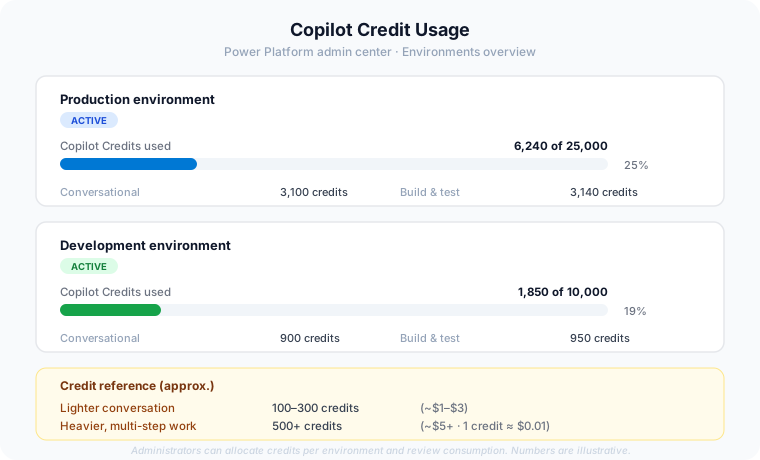
For students and educators, it’s wise to determine what your tenant or lab environment offers before you begin your project. For those deploying at scale, consider the pre-purchase plan, which provides a discount and allows credits to be used over twelve months instead of resetting monthly, affording a bit more room for experimentation.
The reality is framed well by Crosbie: while the costs are not negligible, the gained capabilities are substantial, and the skill you should develop now is assessing the cost versus the value of what you’re building, rather than ignoring the question altogether.
To create a new agent, start at the Copilot Studio homepage where you’ll select a harness. Try building something small and practical with the GitHub Copilot harness—perhaps a task from your current work or coursework limited to three sentences. Keep an eye on the Preview and Evaluate tabs as you refine your work, and track what your credit usage actually looks like on your own setup. You’ll gain far more insight in just a day of hands-on experience than any article could provide.
After that, revisit any projects you’ve already completed, and consider the retrieval vs reasoning question. Some of your existing agents may be perfectly aligned with their designated harnesses, and recognizing which ones is in itself a valuable step forward.
The GitHub Copilot harness was officially launched on August 3, 2026, so feedback from the community is still being gathered, mine included. At present, the knowledge source options are somewhat limited compared to the classic interface but are expected to expand. Many facets of this broader redesign remain in preview status.
For the most accurate benchmark figures, model availability, and credit costs, consult Microsoft Learn directly rather than relying on secondary sources, including this one. If your work involves regulated or governmental environments, always confirm feature availability specific to your cloud before proceeding with your designs.
Learn more: Overview of Agents in GitHub Copilot · Discover the latest updates in Copilot Studio
Share this content:
Discover more from Qureshi
Subscribe to get the latest posts sent to your email.
