Azure CLI on macOS got security upgrade: native broker authentication
If you’re using Azure resources on a Mac, logging in via the az command has traditionally opened a browser window for sign-in, which then returns a token back to your command line interface (CLI). While this method has served well over the years, increasing security demands mean that many organisations are turning to secure authentication brokers to enhance identity safety and mitigate risks related to authentication.
Broker-based authentication is now a security policy requirement for many organisations. Essentially, a broker acts as the operating system’s credential manager. For Windows users, this is known as Web Account Manager (WAM), which allows reusing your already signed-in account instead of needing to open a browser each time. Depending on the broker, your device’s configuration, and any organisational policies, broker-based authentication can offer:
- Device-bound refresh tokens that help secure your tokens from potential misuse or theft.
- Support for Conditional Access and device compliance checks, provided these features are configured in your environment.
- The ability to sign in quickly with accounts recognised by the operating system, reducing those repetitive prompts for credentials.
Until now, Azure CLI had supported broker authentication on Windows. With the release of Azure CLI 2.91.0, organisations that have strict security standards can now also take advantage of broker-based authentication on macOS.
This feature, which is still in preview for macOS, leverages the native broker support in MSAL (Microsoft Authentication Library) and is disabled by default, allowing you to choose when to enable it.
Once you’ve enabled it and run az login, the Azure CLI will use a native macOS account picker instead of launching the sign-in process in a browser. You can choose from accounts already associated with the broker or add a new one. If there’s no compatible broker available, the CLI will revert to the traditional browser-based sign-in flow.
The core library of MSAL is open source, but the macOS broker runtime isn’t. It’s built to adhere to strict compliance and intellectual property regulations while also meeting specific Apple requirements like notarisation.
Azure CLI can now be installed using Homebrew Cask, which meets these incorporation needs and supports broker-based authentication on macOS. You can continue using the well-known package name for fresh installations:
brew update
brew install azure-cli
If you wish, you can specify the Cask directly:
brew update
brew install --cask azure-cli
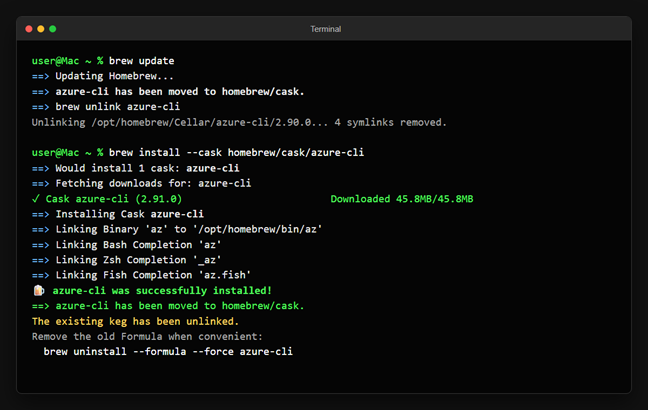
We have successfully tested the migration on a Mac running Azure CLI 2.90.0 installed via the previous Homebrew Formula. After performing brew update, Homebrew identified that azure-cli had migrated to homebrew/cask, unlinked the previous Formula, and downloaded Azure CLI 2.91.0 or later. It then linked the az executable and shell completions from the Cask, confirming:
azure-cli was successfully installed!
azure-cli has been moved to homebrew/cask.
The existing keg has been unlinked.
Homebrew successfully detects the move, installs Azure CLI from Cask, and retains the az command functionality.
Homebrew also suggests removing the outdated Formula record when you can:
brew uninstall --formula --force azure-cli This means scripts using the command brew install azure-cli will remain functional with the same package name. If you have been using the Azure CLI preview tap and Homebrew still refers to outdated Formula metadata, you might want to remove that tap and try again:
brew untap azure/azure-cli
brew update
brew install azure-cli - First, ensure you have Azure CLI 2.91.0 or later installed along with a compatible authentication broker, like Microsoft Company Portal, on your Mac.
- Enable broker-based authentication:
az config set core.enable_broker_on_mac=true
az account clear
You can verify the setting with this command:
az config get core.enable_broker_on_mac 3. Initiate a new sign-in:
az login 4. The Azure CLI will now present the native single sign-on account picker. Choose an existing account and hit Continue, or use the ‘add-account’ button to sign in with a different account.
After enabling broker authentication, the az login command will access the native account picker rather than launching in a browser.
5. To confirm that you’re logged in with the right account and tenant, run az account show.
The introduction of the broker alters how Azure CLI fetches credentials but does not modify its subscription or tenant selection methods. If your account is linked to multiple tenants, you may still need to specify the desired tenant:
az login --tenant If you ever want to opt out and revert to browser-based authentication:
az account clear
az config set core.enable_broker_on_mac=false
az login
Should a compatible broker not be installed or available, Azure CLI will automatically switch back to the browser-based authentication method.
This initiative is part of a larger effort to align the Azure CLI experience on macOS with that of Windows and Linux. We’re eager for feedback from those using Azure CLI on macOS in enterprise settings—please share your thoughts or raise inquiries at Azure/azure-cli on GitHub.
Share this content:
Discover more from Qureshi
Subscribe to get the latest posts sent to your email.
