From reactive firefighting to proactive operations: custom skills for Azure SRE Agent
TL;DR: The Azure SRE Agent excels at handling incidents reactively, but it lacks proactive operations right out of the box. To bridge this gap, I developed an open-source collection of 8 custom skills that introduce governance audits, financial operations reporting, capacity planning, postmortems, and more. When paired with Scheduled Investigations, they transition your operations from simply reactive to proactively managed.
Discover how a chat with a client highlighted the disparity between the Azure SRE Agent’s built-in features and what production teams genuinely require.
Prerequisites: To get started, you’ll need an active Azure SRE Agent deployment, which should take roughly 15 minutes to set up if you don’t have one already.
A few weeks ago, I met with an engineering team that was unfamiliar with the Azure SRE Agent. They were managing a growing SaaS platform on Azure, handling incidents manually, and consuming valuable engineering resources on repetitive diagnostics—essentially in that typical “we don’t have an SRE team, but we need SRE outcomes” dilemma.
I introduced them to the capabilities of the Azure SRE Agent: AI-driven incident investigation, automated root cause analysis, over 40 MCP connectors, sandboxed code execution, and the ability to retain information across investigations. Their immediate response was, “This addresses our reactive issues. But how do we handle proactive tasks?”
That question struck a chord with me, as it was spot on.
Azure SRE Agent: Understanding Its Strengths and Limitations
For those new to the topic, Azure SRE Agent is Microsoft’s AI-assisted site reliability agent, fully available since March 2026. Within Microsoft itself, over 1,300 SRE Agents are operational, managing more than 35,000 incidents each month while saving around 20,000 engineering hours.
Here’s where the SRE Agent shines:
- Reactive incident management: When an alert triggers, the agent jumps into action, investigating the issue, correlating telemetry data, identifying root causes, and either resolving or escalating with the necessary context.
- Automated diagnostics: Whether it’s KQL queries, resource health assessments, or mapping dependencies, all of it occurs in a secure sandboxed environment.
- Memory and learning: Each investigation enhances organisational knowledge as the agent retains past incidents, applying learned context to new ones.
- Integrations: Facilitates collaboration with tools like PagerDuty, ServiceNow, Teams, GitHub (and includes Bring Your Own GitHub App since June 2026), Azure Monitor, and custom APIs via plugins.
However, here’s what it doesn’t offer out of the box:
- Conduct proactive governance audits
- Identify cost optimisation opportunities on a schedule
- Evaluate architectural quality based on the Well-Architected Framework
- Forecast capacity before reaching quota limits
- Create blameless postmortems with structured 5-Whys analysis
- Monitor your Defender Secure Score and suggest improvements
- Assess the production-readiness of your AI/OpenAI workloads
That existing gap between reactive capabilities and proactive measures is precisely why I developed the Skills Pack.
Since June 2026, the Azure SRE Agent has been enhanced with support for Custom Skills and Plugins. A skill acts as a structured prompt providing instructions, context, and report formats that the agent executes using its full suite of tools (Azure Resource Graph, KQL, ARM APIs, Cost Management APIs, and more).
Consider it as follows:
- The agent is your reasoning engine and provides tool access
- A skill offers domain expertise and establishes a methodology
You’ll create a SKILL.md file detailing what to check, how to evaluate findings, and the desired reporting format. The agent takes care of execution, data collection, correlation, and output creation. There’s no need for an SDK, compiled code, or a deployment pipeline—just structured instructions in Markdown.
I developed 8 custom skills that empower the Azure SRE Agent to evolve from a reactive incident handler to a proactive operations ally:
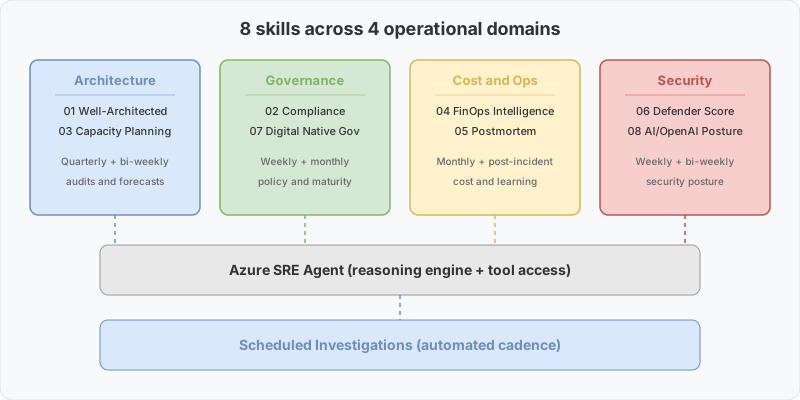
| # | Skill | Purpose | When to Execute |
|---|---|---|---|
| 01 | Well-Architected Review | 5-pillar WAF assessment with maturity scoring | Before production launches, quarterly |
| 02 | Compliance and Governance | Policy, RBAC, tagging, locks, naming audit | Weekly |
| 03 | Capacity Planning | Quota utilisation, growth projection, scaling preparation | Bi-weekly |
| 04 | FinOps Intelligence | Cost optimisation and team chargeback in one report | Monthly |
| 05 | Incident Postmortem | Blameless postmortem generator featuring 5-Whys | After every SEV1/SEV2 incident |
| 06 | Defender Secure Score | Score oversight with a prioritised improvement plan | Weekly |
| 07 | Digital Native Governance | Startup governance maturity (15 checks, scored 0-100) | Monthly |
| 08 | AI Foundry and OpenAI Posture | Security, reliability, and cost assessment for AI workloads | Bi-weekly |
Skill 08 complements the architectural patterns discussed in my companion post: Azure AI Foundry: from zero to production. If you’re managing Foundry workloads, this guide outlines the APIM as AI Gateway, spillover architecture, and the production checklist that this skill will audit.
Here’s a common question I frequently encounter:
| Azure Advisor | SRE Agent Skills | |
|---|---|---|
| Output | Flat list of resource-specific recommendations | Scored reports that include maturity levels and priority |
| Correlation | None; all recommendations stand alone | Links findings across domains (“fix 2.2 first, it prevents 2.5 from being resolved”) |
| Remediation | Refer to documentation | Ready-to-use az CLI commands |
| Scheduling | Passive (you check as needed) | Operates on your schedule, uncovering issues proactively |
| Coverage | Cost, Security, Reliability, OpEx, Performance | + FinOps chargeback, Postmortem, AI posture, governance maturity |
| Context | Generic (the same advice for everyone) | Tailors its approach based on your specific situation |
The Advisor functions like a simple linter, while these skills resemble an experienced SRE who considers everything, correlates findings, and crafts a prioritised actionable plan.
Let’s consider what happens when you instruct your SRE Agent: “Run a governance maturity check on my production subscription.”
The agent will:
- Query the Azure Resource Graph for resource inventory
- Examine Azure Policy assignments and compliance status
- Audit RBAC role assignments against least-privilege principles
- Review completeness of tagging strategies
- Check for resource locks on critical items
- Evaluate naming conventions
- Assess network segmentation
- Audit backup and disaster recovery configurations
- Investigate monitoring and alerting adequacy
- Check secret management practices
…and a further five checks, each scored accordingly. You will receive a single score (e.g., 67/100) along with a prioritised list of necessary fixes, complete with exact commands.
For a startup preparing for an enterprise customer’s security evaluation, this difference could mean showing up with “we think we’re ready” versus delivering “here’s our assessed score backed by evidence.”
The real advantage comes when you combine custom skills with Scheduled Investigations (available since July 2026). Rather than performing skills manually, you can set them to run at regular intervals:
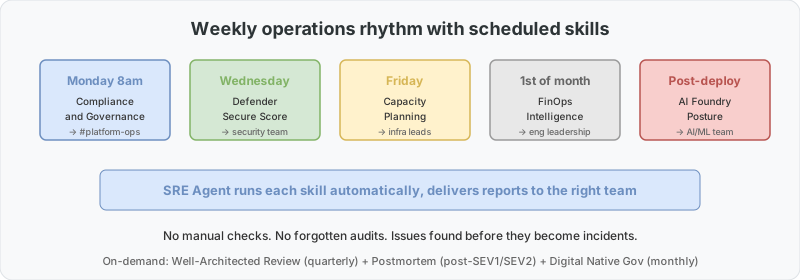
- Every Monday at 8am: Run Compliance & Governance → Post results in #platform-ops
- 1st of each month: Run FinOps Intelligence → Email cost report to engineering managers
- Every other Friday: Run Capacity Planning → Alert on any quota utilisation above 70%
- After every deployment: Run AI Foundry Posture → Confirm no security regressions have occurred
This marks the transition of the SRE Agent from Level 3 (reactive intelligence) to Level 4 (proactive operations) in the SRE maturity model. Instead of waiting for incidents, you start identifying potential issues before they escalate into problems.
- Visit sre.azure.com → Skill Builder
- Click + Create Skill, paste any SKILL.md from the repository
- Begin with Digital Native Governance — it’s the quickest to generate results
- Set a schedule or run the skill on demand
The repository also features sample outputs for every skill, allowing you to see previews before installation.
These skills are open-source (MIT) and designed for customisation. Each SKILL.md file is standalone, which means you can modify thresholds, add checks pertinent to your domain, or adjust scoring weights. The CONTRIBUTING.md file contains guidelines for those who wish to contribute new skills.
Some ideas already suggested by the community include:
- SLA/SLO monitoring dashboard
- Network topology validation tool
- Migration readiness assessments
- Disaster recovery drill simulation
- Health checks for Container Apps / AKS
If your team uses the Azure SRE Agent and feels the same gap between reactive and proactive capabilities, check out the repository here. The community response in the initial week (numerous stars, multiple forks, and contributions) indicates this resonates well with users.
- Install the skills pack — clone the repository, copy the skill folders into your SRE Agent configuration, and activate Skill 01 (Governance Audit) as a Scheduled Investigation to run weekly.
- Run a manual investigation — initiate a governance audit against a non-production subscription. Check the output and modify thresholds in
SKILL.mdto align with your environment’s requirements. - Incorporate into your sprint plans — schedule FinOps (Skill 02) bi-weekly, and Capacity Planning (Skill 05) monthly. After a couple of cycles, you’ll have baseline data to demonstrate the proactive value to your leadership team.
Additional Resources:
Do you have any questions or want to share how you’re utilising the SRE Agent? Feel free to leave a comment or raise an issue on the repository.
Share this content:
Discover more from Qureshi
Subscribe to get the latest posts sent to your email.
